Sell Event Tickets on WordPress
WordPress event ticketing with a free plugin and one shortcode. Sell tickets or collect RSVPs on your own site, with 0% platform fees.
Why WordPress Site Owners Choose Ticket Spot
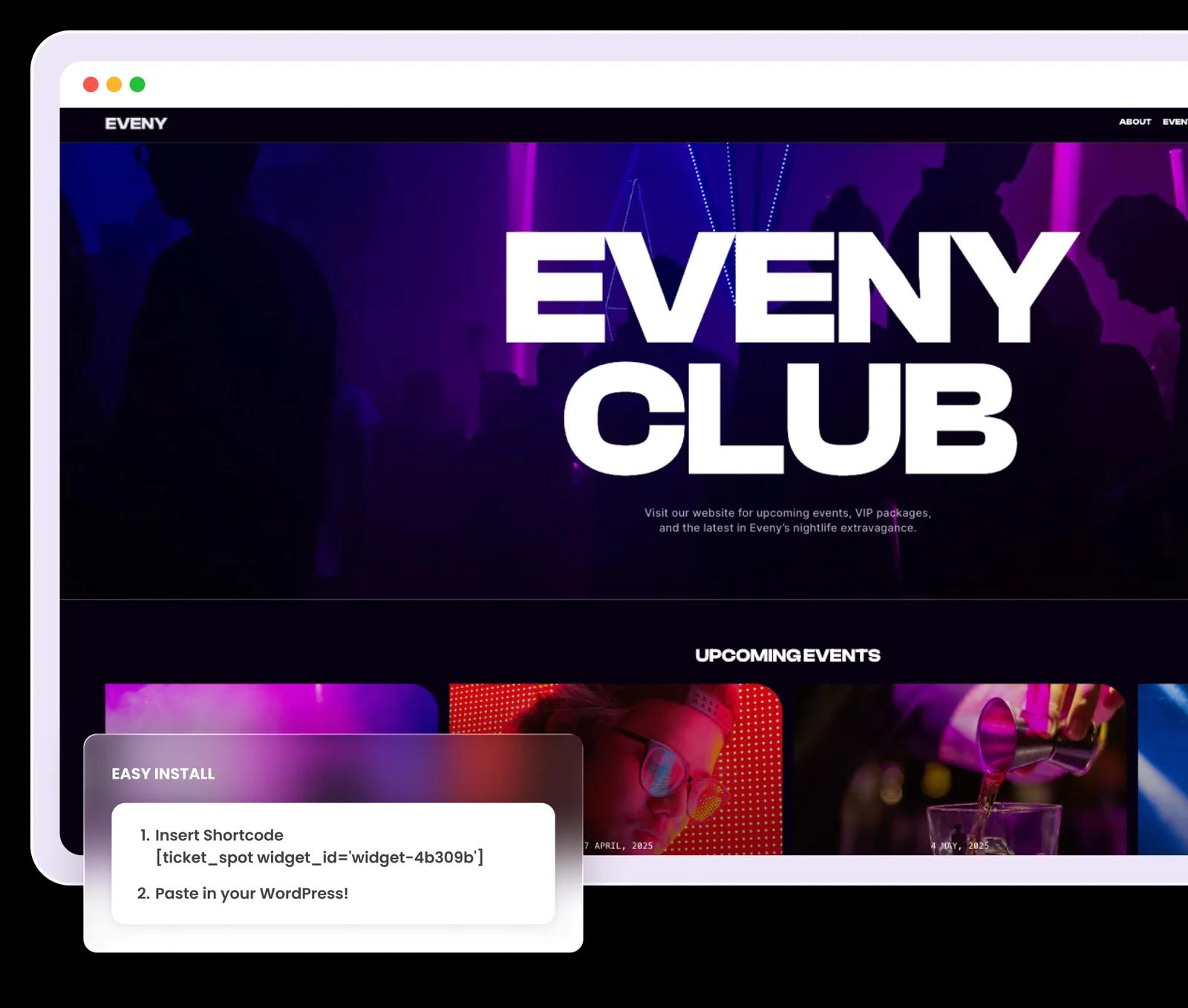
Your WordPress site is the hub of your online presence. Ticket Spot lets you sell event tickets directly on your site without redirecting visitors to a third-party platform. Install our free WordPress plugin, build a widget in your dashboard, and place it with a single shortcode—your attendees browse events, select tickets, and complete checkout without ever leaving your domain.
Whether you're running a community center, a church, a music venue, or a training business, your events live in your Ticket Spot dashboard with flexible ticket types, automated attendee communication, and 0% platform fees. WordPress holds the page; Ticket Spot holds the event.
How it works
Install the free plugin
Search for "Event Tickets, RSVPs, Calendar" in Plugins → Add New, or download it from the WordPress.org plugin directory. The plugin itself is free and does not expire.
Connect your Ticket Spot account
Go to Settings → Ticket Spot in your WordPress admin and sign in. Your events, ticket types, prices and capacity all live in the Ticket Spot dashboard, so nothing about your event is stored in WordPress.
Build a widget and copy its ID
In the Ticket Spot dashboard, create a widget and choose its layout — a calendar, or a list of upcoming events. Fonts and colours are set here too, on the plan tiers noted below. Each widget has its own ID.
Paste the shortcode where you want tickets to appear
Drop [ticket_spot widget_id="your-widget-id"] into any page, post or block that accepts shortcodes. The widget renders in place and checkout completes without sending the visitor to another domain. Add a second widget with a different ID to show something else on another page.
Built for WordPress Site Owners
One Shortcode
Place tickets with [ticket_spot widget_id="your-widget-id"] in any page, post, or block that accepts shortcodes. Note the underscore. Everything about what the widget shows is configured on the widget itself, so the shortcode never needs editing again.
Free WordPress Plugin
Install Event Tickets, RSVPs, Calendar from the WordPress.org plugin directory. The plugin is free, and it stays free—it is the connector between your site and your Ticket Spot account.
Styled to Match Your Site
Set the widget's fonts and colours in the Ticket Spot dashboard so it sits naturally inside your theme, and it adapts to the width it is given on desktop, tablet, and mobile. Font and colour customization starts on the Professional plan.
Checkout on Your Domain
No redirects to third-party checkout pages. Attendees complete their entire purchase on your WordPress site for a fully branded, seamless experience that builds trust and increases conversions.
Calendar or List
Choose the layout when you build the widget: a calendar of everything upcoming, or a responsive list of events. Events can be grouped into categories. Want both? Build two widgets and place both shortcodes.
Direct Payment Processing
Connect your own payment processor and take money directly. Funds go straight to your account with no intermediary—Ticket Spot never touches your revenue.
Everything You Need
- Free tickets and RSVPs on every plan – Collect registrations for free events from the moment you sign up. Selling paid tickets starts on the Professional plan
- Multiple ticket types – Create separate ticket tiers with their own prices and capacity
- Capacity management – Set maximum attendee counts per event and automatically close sales when events are full
- PDF tickets, QR codes and digital wallets – Attendees receive a PDF ticket with a QR code and can add it to Apple Wallet or Google Wallet, from the Professional plan. Putting your own logo and colours on those tickets is Business and above
- QR code check-in – Scan attendees in with the event check-in app for fast, contactless entry
- Automated email reminders – Reduce no-shows with scheduled email campaigns before your event
- Registration questions – Collect attendee details, dietary preferences, T-shirt sizes, or any custom answer at checkout
- Sales analytics – Track ticket sales, revenue, and attendee data from your Ticket Spot dashboard
Full-featured event ticketing for your WordPress site—with 0% platform fees. Payment processors charge their standard transaction fees; Ticket Spot adds nothing on top. Plan tiers above are read from the live plan matrix; the pricing page is the full breakdown.
Compare Plans →How This Differs
- vs a self-hosted ticketing plugin – Plugins that run ticketing inside WordPress make your site responsible for inventory, payments, and email deliverability. Ticket Spot keeps the widget on your page and the event data on our infrastructure, so a plugin conflict or a theme update cannot break a sale in progress
- vs an Eventbrite embed – Embeds hand the attendee relationship, the branding, and the per-ticket fee to someone else. Ticket Spot keeps checkout on your domain and charges no platform fee per ticket
- vs a calendar plugin with a ticketing add-on – Calendar-first tools treat ticketing as an extra you buy on top. Ticketing is the product here, and the calendar is one of the widget layouts
Learn More
Explore how Ticket Spot works with WordPress and other platforms: read our WordPress event ticketing shortcode guide or browse all website integrations. See our third-party integrations to connect Mailchimp, Zapier, Zoom, and more.
"This plugin will be for 100 rating but now I'm leaving only five. 100% recommended plugin events and also you can use it on your travel agency packages because it's also flexible for it."— nishat1098, WordPress.org review
Frequently asked questions
Install the free Ticket Spot plugin, connect your account under Settings → Ticket Spot, build a widget in the Ticket Spot dashboard, then paste [ticket_spot widget_id="your-widget-id"] into any page or post.
[ticket_spot widget_id="your-widget-id"] — note the underscore in ticket_spot. widget_id is the only attribute it takes; what the widget displays and how it looks are set on the widget itself in the Ticket Spot dashboard.
Yes. Choose the calendar layout when you build the widget, then place that widget's shortcode on any page. A responsive list of events is the other layout.
Yes. Visitors browse events, pick tickets and pay inside the widget on your own WordPress page, without being redirected to a separate checkout domain.
The plugin is free and Ticket Spot charges 0% platform fees — your payment processor's standard transaction fees still apply. The free plan covers free tickets and RSVPs; selling paid tickets starts on the Professional plan.