QR code tickets for Shopify orders
What exists once the Shopify order is paid: a branded PDF ticket with a scannable code, Apple and Google Wallet passes, and a record at the door that knows whether the code has already been used. One code per admission, not one per order.
What the buyer receives
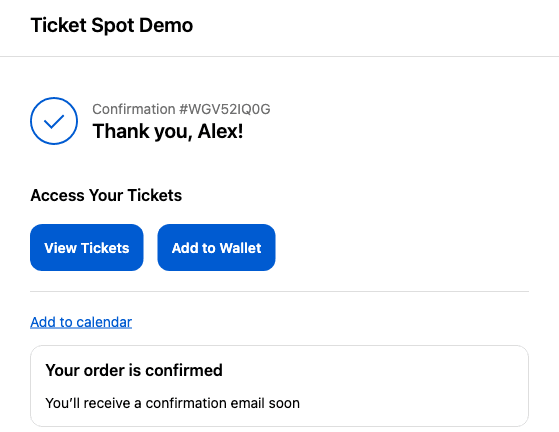
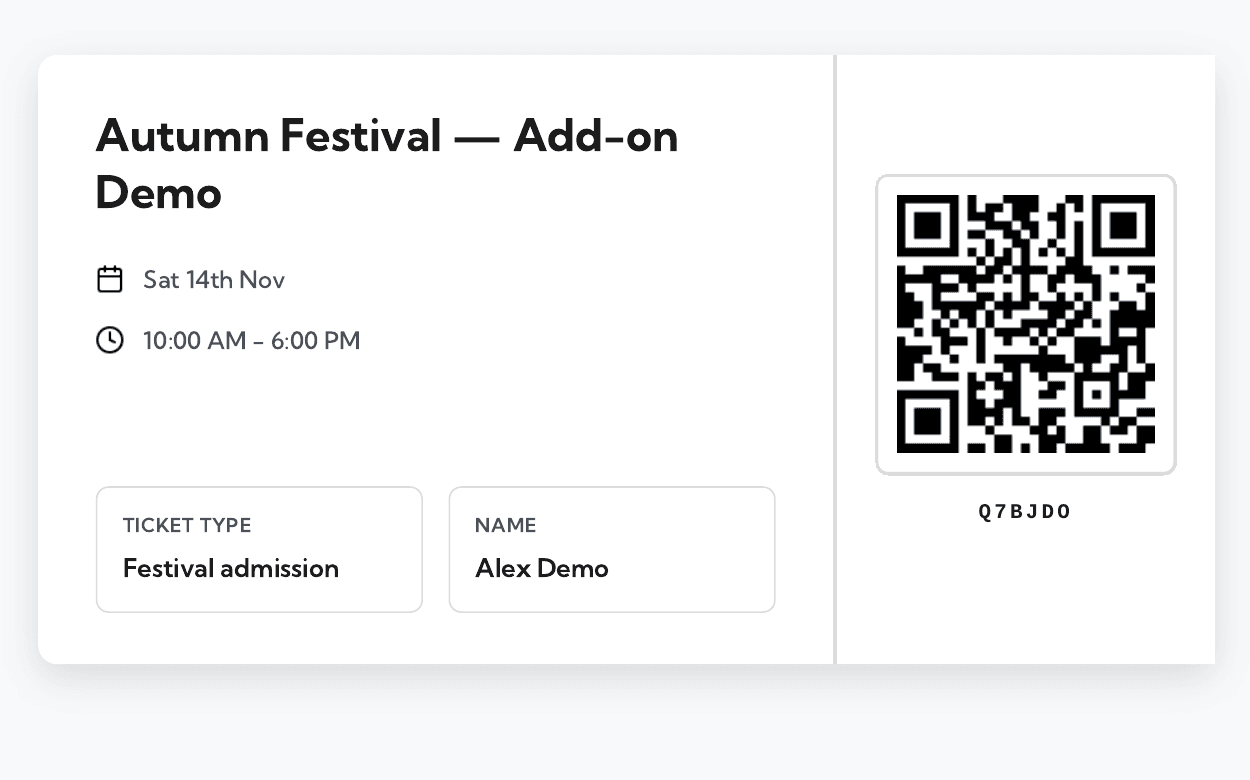
The moment a Shopify order for an event is paid, Ticket Spot generates the tickets it describes and puts them in three places: Shopify's own thank-you page, the confirmation email, and the attendee portal. Each ticket is a branded PDF carrying a scannable QR code, and a PDF receipt is produced alongside it.
The thank-you page matters more than it looks. It is the one moment you know the buyer is present and paying attention, and an attendee who saves their pass there is an attendee who does not email you the night before asking where their ticket is.
From paid order to admitted attendee
The Shopify order is paid
Your own checkout, your own payment provider. Nothing about this step is ours.
A ticket is generated per admission
Each one carries its own QR code, so a family of four gets four codes rather than one shared code.
- choose oneor
Branded PDF
On the thank-you page and attached to the confirmation email.
orApple Wallet pass
Offered on the Shopify thank-you page.
Google Wallet pass
Through the confirmation email and the attendee portal.
Presented at the door
On a phone screen or on paper. All three formats carry the same code.
Scanned and checked in
A phone camera or a barcode scanner. Already-scanned tickets are flagged; the device needs a live connection.
One code per ticket, not one per order
A family buying four tickets gets four codes. This sounds like a detail and is not: it decides whether the four of them have to arrive together. With one code per admission, three can go in at seven and the fourth can turn up at half past, each scanned separately, each recorded separately. With one code per order they would be tied to each other, and the person holding the phone would have to wait at the gate.
It also means the guest list is a list of attendees rather than a list of buyers. Registration answers, dietary requirements and waivers attach to the person who is coming, and check-in history is kept per attendee rather than per transaction.
The deliberate exception is a group ticket — one purchase that admits a fixed number of people, such as a table of eight. That is one ticket and one code by design, counted once at the door, because the thing being sold is the table rather than eight seats.
What a scan actually checks
Scanning a ticket does not read the attendee out of the code. It resolves the code to that attendee's record, and the door app reads everything it shows you — the name, the ticket type, the answers to your registration questions, whether the ticket has already been used — from the record, not from the printed square.
The practical consequence is that a ticket's validity is a fact about the record and not about the paper. A refunded order is invalid even though the PDF still looks perfect, and a screenshot of somebody else's ticket is worth exactly one scan, because the second one is flagged. It is also why a lost PDF is not a crisis, which is the next section.
What this page will not tell you is what the encoded string itself contains. It is not something we document, so it is named under what this does not do instead of being described. If you have a data-protection review that turns on it, that is a question for support rather than a paragraph on a marketing page.
Wallet passes, and where each one turns up
Apple Wallet and Google Wallet are both supported on the same plan, and they do not arrive by the same route. The Apple pass is offered on the Shopify thank-you page; the Google pass comes through the confirmation email and the attendee portal. There is no setting that makes them match, so it is worth knowing which one you are telling a customer to look for.
| What the attendee gets | Shopify thank-you page | Confirmation email | Attendee portal |
|---|---|---|---|
| Branded PDF ticket with QR code | Yes | Yes | Yes |
| PDF receipt | Yes | Yes | Yes |
| Apple Wallet pass | Yes | — | — |
| Google Wallet pass | — | Yes | Yes |
| Add to Google Calendar | Yes | — | — |
| Calendar file for Apple Calendar and Outlook | — | Yes | — |
The thank-you page column requires the Thank-You Page app block, on Professional plans and above.
What goes on the ticket itself — your logo, the layout, which details are printed next to the code — is covered in create and customise tickets.
When a code stops working
A paid Shopify order becomes attendees in Ticket Spot, and Ticket Spot follows refunds and edits through, so the guest list and your Shopify admin describe the same thing. Refund the order and the attendee comes off the list; the ticket is no longer a valid admission even though nothing about the PDF changes.
That takes effect immediately, so the door rejects a refunded code straight away. Because every scan is checked against the live list rather than a copy sitting on the device, there is no window in which a refunded ticket still works at one gate and not another.
There is no self-service handover that turns a ticket over to a different person with a fresh code — changing who is coming is a change you make, not one the attendee performs.
Lost tickets
Because the record is the ticket, a lost download is a retrieval problem rather than a reissue problem. The same PDF is attached to the confirmation email and available in the attendee portal, and the wallet pass can be added again from either. A wiped phone, a deleted email attachment and a laptop left at home all resolve to the same answer, which is worth putting in your pre-event email in advance.
For genuinely stuck attendees, the door is the fallback. A scanner operator can find someone on the guest list by name and check them in without a code at all, which is the case that matters at five past seven with a queue behind them.
Validation at the door
Scanning is done with the free Ticket Spot check-in app, which reads the code from a phone screen or from paper using the device camera. It also accepts USB and Bluetooth barcode scanners that send keystrokes, in the app and in the web dashboard — noticeably faster than a camera once there is a queue.
It does need a live connection. There is no offline check-in mode, so a device in a basement venue with no signal cannot admit anyone until the signal is back — worth testing at the doorway itself during the walkthrough. Duplicate presentation is flagged rather than silently accepted, and check-in history is kept per attendee.
That is the summary; the app, the hardware and what the door needs from your network are covered properly in the check-in app.
What this does not do
The boundaries, including the one place where we would rather say "not documented" than describe something we have not confirmed.
QR tickets are not on the free plan
PDF tickets with QR codes, PDFs attached to emails, and Apple and Google Wallet passes all start on Professional, at $29.99 a month. The Thank-You Page app block starts on the same plan. The free plan issues free tickets to 20 attendees a month without them.
Apple and Google Wallet do not arrive by the same route
The Apple Wallet pass is offered on Shopify's thank-you page. The Google Wallet pass comes through the confirmation email and the attendee portal instead. Both exist on the same plan; only the place you find them differs, and there is no setting that makes them match.
We do not publish what the QR payload contains
A scan resolves to the attendee's record and the door app reads their details from there — but the exact contents of the encoded string is not something we document, so this page does not describe it. If you have a data-protection review that turns on it, ask support rather than assuming either way.
The door needs an internet connection
There is no offline check-in mode. Every scan is validated against the live attendee list, so a device with no signal cannot admit anyone until the signal comes back. Test the connection at the doorway itself rather than at the box office, and keep a hotspot in reserve if the venue Wi-Fi is shared with the audience. The compensation is that nothing is ever stale: a refund made seconds ago is already rejected at the gate, and two doors cannot drift out of step.
There is no built-in attendee-to-attendee transfer
Nothing here turns a ticket over to a different buyer with a new code and an invalidated old one. Changing who is coming is a change to the Shopify order and to the attendee record, done by you, not a self-service handover the attendee performs.
Square POS ticket sales are not Shopify orders
Walk-up selling through Square POS is supported at the platform level and produces its own tickets, but it is configured outside the Shopify app and those sales never become Shopify orders. Two systems, two order records, one guest list.
Plan-by-plan detail is on the pricing page. If your event assigns people to specific places rather than admitting them generally, see seating charts on your Shopify product page — the seat is printed on the same ticket as the code.
Frequently asked questions
One per admission. A family buying four tickets receives four codes, and each is scanned and checked in separately, so three people can arrive at seven and the fourth at half past. The exception is a group ticket, which is deliberately one ticket that admits a fixed number of people — one code, counted once.
In three places, and they do not all carry the same things. Shopify's thank-you page offers the PDF ticket, the Apple Wallet pass and an add-to-Google-Calendar link, which is the fastest route because the buyer is still on the page. The confirmation email carries the PDF, a calendar attachment and the Google Wallet pass. The attendee portal has the PDF and the Google Wallet pass whenever they need them again.
Not much, because the PDF is not the ticket — the record is. The same ticket is reachable from the confirmation email and from the attendee portal, so a deleted download or a wiped phone does not need a replacement to be issued. The wallet pass can be added again from the same places.
It can be presented twice, and the second scan is flagged rather than quietly accepted. The check-in app shows that the ticket has already been used and keeps a check-in history per attendee, which is what turns a duplicate into a conversation at the door instead of two people in one seat.
Ticket Spot follows the refund through immediately, so the attendee comes off the guest list and the door rejects the code straight away. Edits to a Shopify order are followed through the same way. Because every scan is checked against the live list rather than a copy held on the device, there is no window in which a refunded ticket still works at one gate.
Yes. There is no offline check-in mode: every scan is validated against the live attendee list, so each scanning device needs a working connection for the whole time the door is open. Test the signal where staff will actually stand rather than at the box office, and keep a phone hotspot in reserve if the venue Wi-Fi is shared with the audience. Phone cameras work, and so do USB and Bluetooth barcode scanners that send keystrokes — faster than a camera at a busy gate.