Ticketing for Museums & Attractions
Let visitors choose an arrival time and help your team prepare for each booking window.
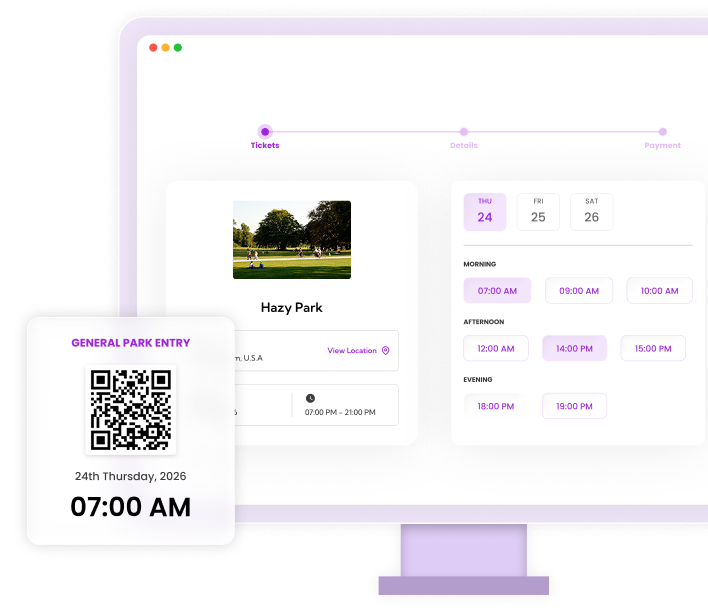
From the first booking to the door
Museums, gardens and tour operators need an admission schedule that visitors understand. Ticket Spot lets you publish dates, time slots and ticket options on your own website. Use capacity limits to manage bookings for each entry window, then validate tickets against the live guest list on arrival.
See a walkthrough for your event →Set up your ticket sales
Build the visit schedule
Set the dates and time slots that you intend to sell. Choose capacity for each window based on the visit or tour you can deliver. Timed admission controls bookings; it does not automatically measure everyone physically inside your venue.
Explain visitor ticket options
Create adult, child or other admission types and explain eligibility. State whether a time means arrival or tour departure, how long the visit lasts and what happens if someone is late. Keep accessibility and group-enquiry information near the booking button.
Test booking and arrival
Try a visitor booking on mobile, check the date and time on the resulting ticket and scan it at the entrance. Test a wrong-time ticket as well. Staff devices need internet access because scanning checks the live guest list.
Tools for the booking and arrival experience
Timed-entry booking
Set up time slots and capacity for admission windows. Our timed-entry guide explains the scheduling model and plan requirements in more detail.
Explore timed-entry booking →Visitor check-in
Scan QR tickets or locate a guest in the attendee list. Confirm any hardware or turnstile integration with us before buying equipment; this page does not promise automated gate control.
Explore visitor check-in →Shopify attraction sales
Sell tickets through your Shopify cart alongside your existing storefront. Use the optional Ticket Selector when the schedule needs a date-and-time interface.
Explore shopify attraction sales →A setup example
For a museum offering morning visits at 10:00 and 11:00, publish those slots and their ticket capacities. Verify that booking the final place closes availability for that slot and that the ticket displays the chosen time. Admission slots are not a substitute for monitoring visitor dwell time or shared capacity across rooms.
This illustrates a possible configuration, not a customer result. Test your own dates, ticket rules and entry process before opening sales.
Budget for your event
Paid tickets start on Professional at $29.99/month, including 500 attendees. Reserved seating starts on Business at $99/month, including 1500 attendees and 250 reserved seats. These are separate monthly allowances. Larger events may need ticket packs, Reserved Seating Packs or a higher plan. Payment processing, taxes and any Shopify subscription are additional.
Check current plans, feature availability and pack prices →Choose your sales channel
Use a hosted event page, embed tickets on your own website, or sell event tickets through Shopify. For Shopify, buyers use your store's cart and checkout; the optional Ticket Selector handles seats and detailed bookings. Test the complete journey on a phone, including delivery of the ticket and the first scan.
Comparing platforms? Read our Eventbrite comparison, Ticket Tailor comparison and TicketSpice fee comparison.
Frequently asked questions
Visitors select a date, time and ticket option. Configure the schedule and capacity for each entry window, then test the booking and check-in rules before selling tickets.
This page describes ticket and time-slot capacity. It does not promise shared resource management or live occupancy across multiple attractions, rooms or rides.
Ticket Spot supports memberships and annual passes on eligible plans. Confirm the assigned events and visit limits you need, and test redemption before launching a pass.
The documented workflow here is staff scanning QR tickets against a live guest list. Ask us to confirm compatibility for a specific turnstile or access-control system before committing to it.