You're running a conference, training day, or multi-track event. Attendees buy a main ticket — but the real value is in the breakout sessions and workshops they attend during the day.
The problem? Most ticketing platforms treat workshops as completely separate events. Attendees register for the main event on one page, then have to find and sign up for workshops somewhere else. Some never do. Others sign up for too many and don't show. You end up with half-empty rooms and frustrated speakers.
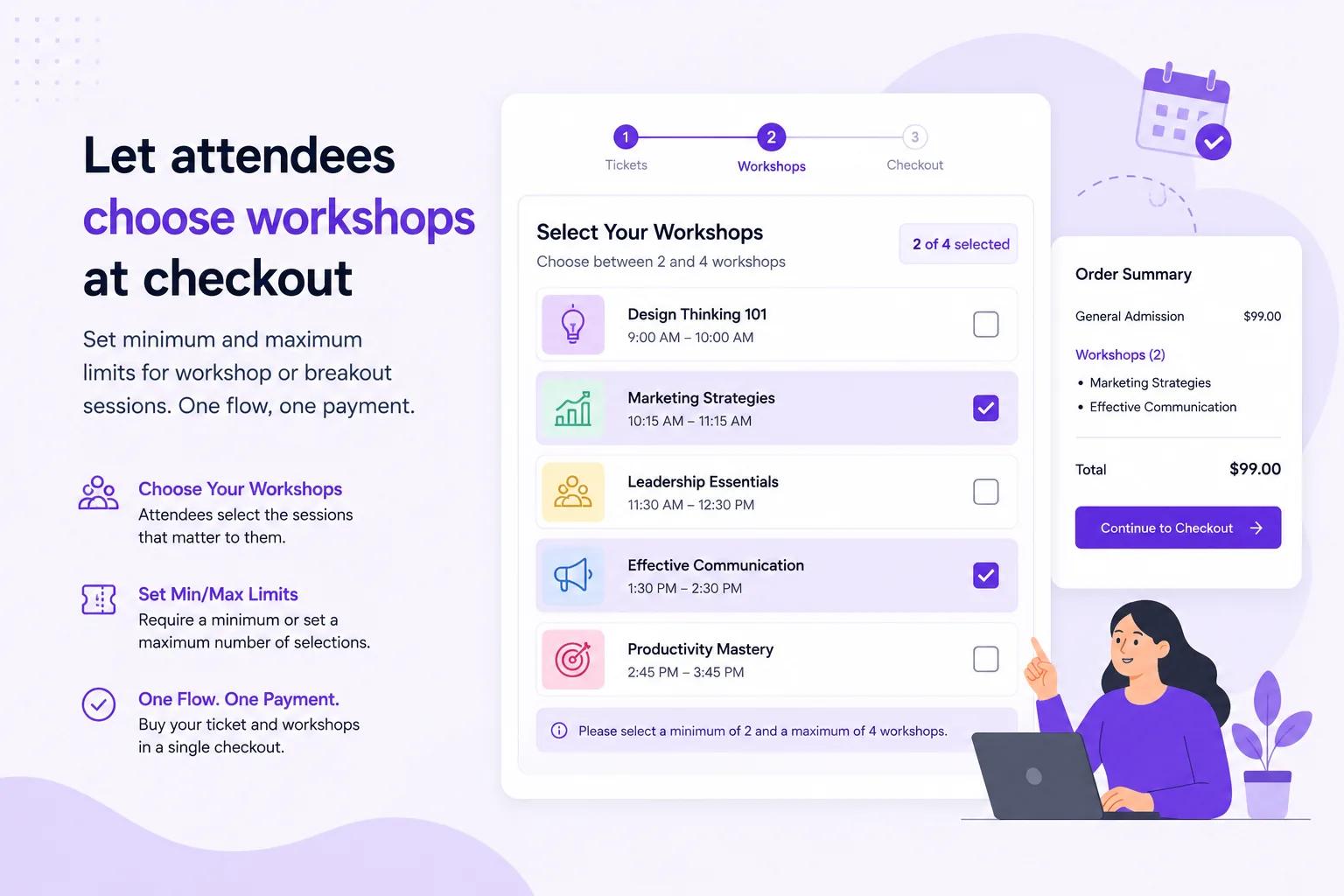
Ticket Spot's Event Add-Ons solve this by letting attendees select their workshops at checkout, as part of the same ticket purchase — with configurable minimum and maximum limits so every attendee picks the right number of sessions.
The Problem: Workshop Registration Is Usually Broken
Here's what typically happens at multi-track events:
- Attendee buys a conference ticket on your ticketing platform
- You email them a separate link to "choose your workshops"
- That link goes to a Google Form, Typeform, or a second ticketing page
- Some attendees fill it out. Many don't.
- You manually reconcile two separate lists
- On event day, some workshops are overcrowded, others are empty
The result:
- 30-40% of attendees never select their workshops
- No capacity enforcement — popular sessions overflow
- No-show rates for individual sessions run 25-40%
- You have no reliable headcount for room assignments, materials, or catering
This happens because workshop selection is disconnected from the ticket purchase. When it's a separate step, people skip it.
The Solution: Workshop Selection Built Into Checkout
With Ticket Spot's Event Add-Ons, workshop selection happens inside the ticket checkout flow. The attendee:
- Selects their main ticket (General Admission, VIP, etc.)
- Sees available workshops and breakout sessions
- Picks their sessions (with min/max limits you define)
- Pays once for everything
- Receives one confirmation with their main ticket + all workshop tickets
No second registration. No separate form. No manual reconciliation.
Setting Min/Max Workshop Limits
The key feature that makes this work for conferences and training events: you can set minimum and maximum limits on how many add-on sessions an attendee must select.
Examples:
| Event Type | Main Ticket | Min Sessions | Max Sessions |
|---|---|---|---|
| Marketing Conference | $199 GA | 2 | 4 |
| Leadership Summit | $499 VIP | 3 | 6 |
| Teacher Training Day | $75 Registration | 3 | 3 (exactly 3) |
| Tech Workshop Day | $0 Free | 1 | 5 |
| Corporate Retreat | $350 Team | 2 | unlimited |
Why minimums matter: They guarantee every attendee has a schedule. No more "I didn't know I was supposed to pick sessions" on event day. When someone buys a ticket, they commit to their sessions upfront.
Why maximums matter: They prevent one attendee from grabbing every session, which creates scheduling conflicts and inflates headcounts. Maximums keep the distribution fair and your capacity numbers accurate.
How to Set It Up in Ticket Spot
Step 1: Create Your Main Event
Create your conference or training event with your standard ticket types:
- General Admission
- VIP / Premium
- Early Bird
- Student / Nonprofit discount
- Group packages
Set your event dates, venue, and branding as usual.
Step 2: Create Your Workshop Add-Ons
Within the same event, add each workshop or breakout session as an Event Add-On:
For each workshop, configure:
- Name — "Advanced SEO Workshop with Jane Smith"
- Description — What attendees will learn, who it's for, skill level
- Price — $0 (included with ticket), $29, $49, etc.
- Capacity — Maximum attendees for this session (e.g., 30)
- Schedule — Date, start time, end time
- Location — Room name or number (for attendee reference)
Step 3: Set Your Min/Max Selection Rules
Configure how many add-ons attendees must select:
- Minimum — The fewest sessions an attendee must pick to complete checkout
- Maximum — The most sessions an attendee can add
If you set min = 2 and max = 4, the attendee cannot check out until they've selected at least 2 workshops, and they won't be able to select more than 4.
Step 4: Publish and Sell
Your event page shows the main ticket. When attendees click "Buy," the checkout flow presents workshop options automatically. They pick their sessions, pay once, and receive:
- Main event ticket (PDF + Apple Wallet)
- Individual workshop tickets for each session they selected
- One confirmation email with their full schedule
- Automated reminders before each session
Real-World Examples
🎯 Marketing Conference (3 Tracks, 12 Sessions)
Setup:
- Main ticket: $249 (includes access to 3 breakout sessions)
- 12 workshops available across 3 time slots
- Min: 3 / Max: 3 (one per time slot)
- All workshops included in ticket price ($0 add-on cost)
Workshops offered:
| Time Slot | Option A | Option B | Option C | Option D |
|---|---|---|---|---|
| 10:30 AM | Content Strategy | Paid Social | Email Automation | Analytics Deep Dive |
| 1:30 PM | SEO Workshop | Influencer Marketing | CRM Integration | Brand Storytelling |
| 3:30 PM | AI in Marketing | Social Media Ads | Community Building | Marketing Ops |
How it works: Attendee buys the $249 ticket. At checkout, they must pick exactly 3 workshops — one per time slot. Each workshop has a 40-person cap. When a session fills up, it shows as "Full" and attendees choose from remaining options.
Result: 100% of attendees have a workshop schedule before event day. Room assignments are accurate. Speakers know their audience size. No overflow, no empty rooms.
💼 Professional Development Day (Choose Your Track)
Setup:
- Registration: $150 (includes 2 required workshops + up to 2 optional ones)
- 8 workshops available
- Min: 2 / Max: 4
- Required workshops are free; optional premium workshops are $35 each
Workshop options:
| Workshop | Price | Capacity | Duration |
|---|---|---|---|
| Leadership Fundamentals | Included | 50 | 90 min |
| Conflict Resolution | Included | 40 | 90 min |
| Executive Presence | Included | 35 | 90 min |
| Public Speaking Intensive | $35 | 25 | 90 min |
| Negotiation Masterclass | $35 | 25 | 90 min |
| Strategic Planning Lab | $35 | 30 | 90 min |
| Coaching Skills for Managers | Included | 40 | 90 min |
| Data-Driven Decision Making | $35 | 30 | 90 min |
How it works: Attendee pays $150 for registration. At checkout, they must select at least 2 workshops. They can add up to 4 total. Free workshops are included; premium ones add $35 each to the total. One payment covers everything.
Result: Average order value increases from $150 to $198 as 70% of attendees add at least one paid premium workshop. Every attendee has a minimum 2-session schedule committed at purchase.
🎓 Teacher Training Conference (CEU Credits)
Setup:
- Conference ticket: $199 (3 days)
- 20+ workshops across 3 days
- Min: 4 / Max: 8
- Each workshop = 1 CEU credit
- Teachers need minimum 4 credits for professional development requirement
How it works: Teachers buy the $199 conference ticket. The checkout requires them to pick at least 4 workshops (satisfying their CEU minimum) and allows up to 8. Each workshop has a capacity limit. Teachers receive individual tickets for each session with QR codes for check-in — providing verified attendance records for CEU documentation.
Result: Every teacher leaves with at least 4 CEU-eligible sessions locked in. The check-in app creates a digital attendance record per session — perfect for CEU verification.
🏢 Corporate Team Offsite (Department Rotations)
Setup:
- Team registration: $0 (internal event, free tickets)
- 6 department workshops available
- Min: 3 / Max: 3 (everyone attends exactly 3)
- Capacity: 20 per workshop
Workshops:
- Product Roadmap Review
- Engineering Architecture Overview
- Sales & GTM Strategy
- Customer Success Deep Dive
- Finance & Ops Planning
- People & Culture Session
How it works: Each employee registers for the offsite (free ticket). At checkout, they must pick exactly 3 department sessions. Capacity limits ensure no single session is overloaded. The organizer gets a clean headcount per room without sending a single survey.
Result: Zero back-and-forth emails asking "which sessions do you want?" Everything is handled in one self-service registration flow.
Why This Approach Works Better
1. Higher Workshop Registration Rates
When workshop selection is part of the ticket purchase, 95%+ of attendees select their sessions — compared to 60-70% when it's a separate step. The checkout won't complete until they've made their picks, so nobody falls through the cracks.
2. Accurate Capacity Planning
Because every attendee selects their sessions at purchase time, you know your headcounts weeks before the event — not the morning of. This means:
- Right-sized rooms for every session
- Accurate material and handout quantities
- Proper catering orders per breakout room
- Correct AV setup per session size
3. Reduced No-Shows per Session
Attendees who select (and pay for) workshops at purchase time have a commitment investment. They've already decided which sessions they'll attend. Studies show that pre-committed session selection reduces individual workshop no-show rates by 40-60% compared to day-of walk-in models.
4. One Source of Truth
No more reconciling spreadsheets from two systems. Your main event roster and every workshop roster live in one Ticket Spot dashboard. Export attendee lists per session. Check in per session. Report on revenue per session. Everything in one place.
5. Better Attendee Experience
Attendees prefer this model. One purchase. One confirmation. One place to view their full schedule. No hunting for a second registration link. No "am I signed up for that workshop?" confusion on event day.
Features That Support Workshop Events
Per-Session Check-In
Use the Ticket Spot check-in app to scan attendees into each individual workshop. Track who actually attended (not just who registered). Export attendance reports per session for CEU credits, compliance, or post-event analytics.
Automated Reminders Per Session
Attendees receive automated reminders for each workshop they registered for — not just the main event. "Your SEO Workshop starts in 30 minutes in Room 204" keeps attendees on schedule.
Separate Attendance Lists
Export a clean attendee list for each workshop. Share it with the speaker or facilitator so they can prepare for the right group size. No manual filtering required.
Waitlists Per Session
When a workshop hits capacity, a waitlist opens automatically. If someone changes their selection or cancels, the next person in line gets notified. Seats don't go to waste.
Revenue Analytics Per Add-On
See exactly how much revenue each workshop generates. Identify which sessions are most popular and which underperform. Use this data to plan your next event's workshop lineup.
Integrations for Workshop Events
Klaviyo for Session-Based Email Flows
Sync attendee data to Klaviyo and build email flows based on which workshops someone selected:
- Send pre-workshop prep materials specific to each session
- Post-workshop follow-up with speaker slides and resources
- "You attended SEO Workshop — here's our Advanced SEO course" upsell
- Segment attendees by interest area based on workshop choices
Shopify for Ticket Sales
Sell conference tickets with workshop selection through your Shopify store. The Ticket Selector App Block handles the main ticket, and add-ons appear in the checkout flow.
Square POS for Walk-Up Registrations
Handle day-of registrations with Square POS. Walk-up attendees can still select available workshops (capacity permitting) and their roster syncs in real time.
Custom Domain for Professional Registration
Run your conference registration on your own domain — not a third-party ticketing site. Attendees see your brand throughout the entire ticket purchase and workshop selection flow.
Getting Started
1. Create Your Event
Set up your conference or training event in the Ticket Spot dashboard with your main ticket types.
2. Add Your Workshops
Create each workshop as an Event Add-On with name, price, capacity, schedule, and description.
3. Set Min/Max Limits
Configure the minimum and maximum number of workshops attendees must select at checkout.
4. Publish and Promote
Share your event page. Attendees buy tickets and select workshops in one seamless flow.
5. Manage on Event Day
Use the check-in app to scan attendees into each session. Export attendance lists. Track everything from one dashboard.
Start Selling Workshops Alongside Tickets
Stop losing workshop registrations to disconnected forms and manual processes. Let attendees pick their sessions at checkout — with min/max limits that guarantee full rooms and accurate headcounts.
For more on Event Add-Ons, see our complete add-ons guide and workshops landing page.
Questions about workshop ticketing? Email support@ticketspotapp.com.