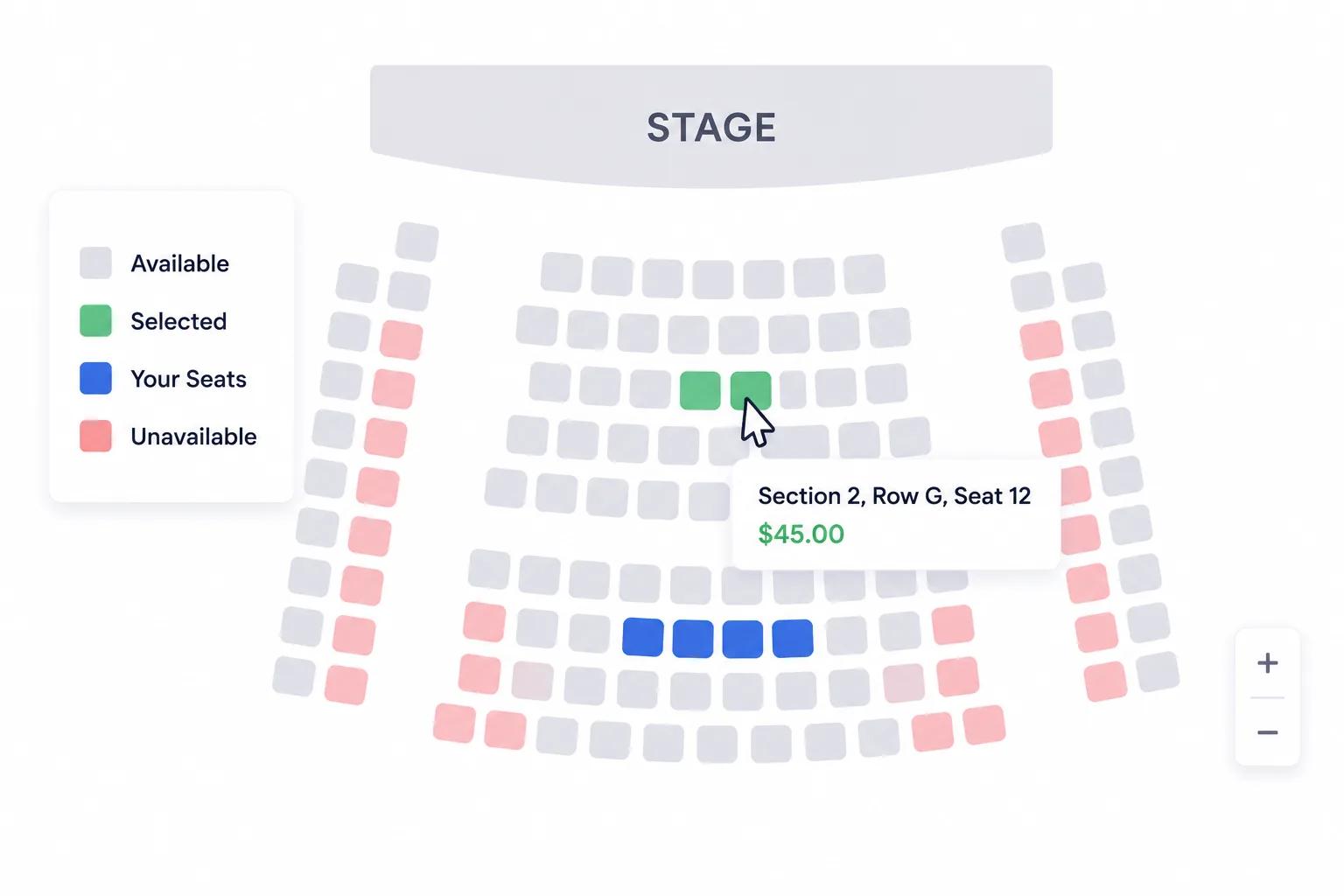
Reserved seating transforms the event experience. Instead of a rush for the best spots, attendees browse an interactive map, pick their exact seat, and check out with confidence.
Ticket Spot now offers interactive seating charts with a drag-and-drop builder that lets you create professional venue layouts in minutes-no design skills required.
Why Seating Charts Matter
General admission works for many events-but for others, assigned seating is essential:
- Higher ticket prices: Attendees pay more when they can choose premium seats
- Better attendee experience: No stress about arriving early to claim a spot
- Tiered pricing: Charge different prices for VIP, premium, and standard sections
- Operational control: Know exactly who sits where for security, catering, and logistics
- Professional perception: Reserved seating signals a well-organized, premium event
Organizers using reserved seating consistently report 20-35% higher average ticket prices compared to general admission.
Ticket Spot's Seating Chart Builder
Build any venue layout with an intuitive drag-and-drop interface.
Core Features
🪑 Drag-and-Drop Seat Builder
- Place rows, individual seats, tables, and sections
- Snap-to-grid alignment for clean layouts
- Copy and paste seat groups for faster building
- Undo/redo for easy experimentation
🗺 Upload Venue Floor Plans
- Import your actual venue layout as a background image
- Place seats directly over the floor plan for pixel-perfect accuracy
- Supports PNG, JPG, and SVG formats
- Scale and position the background to match your seat layout
🏷 Custom Naming & Labels
- Name rows (A, B, C or 1, 2, 3)
- Number seats within rows
- Label sections (Orchestra, Balcony, Mezzanine)
- Add custom notes to individual seats
🔄 Reusable Templates
- Save your seating chart as a template
- Reuse it for recurring events at the same venue
- Edit templates without affecting past events
- Share templates across multiple event organizers
Venue Types You Can Build
Ticket Spot's seating chart builder supports any venue layout. Here are the most common configurations:
🎭 Theaters & Performing Arts Centers
Classic row-based seating with sections:
- Orchestra: Front rows with premium pricing
- Mezzanine: Mid-level seating with great views
- Balcony: Upper level with value pricing
- Box seats: Private sections with special pricing
Perfect for: plays, musicals, comedy shows, dance performances, film screenings, and lecture series.
Typical layout: 200-2,000+ seats arranged in curved or straight rows with center aisles.
🏟 Sports Venues & Arenas
Multi-section layouts with zones:
- Courtside / Pitch-side: Premium front-row seats
- Lower bowl: Close-to-action sections
- Upper bowl: Value seating with overview
- Suites: Private enclosed sections
- Standing areas: General admission zones with capacity limits
Perfect for: basketball, hockey, soccer, wrestling, boxing, esports tournaments, and indoor sporting events.
Typical layout: Sections arranged around a central area, each with numbered rows and seats.
🏢 Conference Halls & Convention Centers
Flexible table-based arrangements:
- Round tables: 8-12 seats per table for networking events
- Classroom style: Rows facing a stage or screen
- U-shape: Tables arranged for workshops and meetings
- Theater style: Chairs without tables for keynotes
- Mixed layouts: Combination of tables and rows
Perfect for: conferences, trade shows, corporate meetings, award ceremonies, and industry summits.
Typical layout: 20-100+ tables with flexible seating assignments.
💒 Wedding Receptions & Galas
Elegant table assignments:
- Head table: Special seating for the wedding party
- Numbered guest tables: Round or rectangular with assigned seats
- VIP tables: Premium placement near the stage or dance floor
- Family sections: Grouped seating for relatives
- Dance floor buffer: Tables arranged around a central open area
Perfect for: weddings, galas, charity dinners, fundraisers, award banquets, and formal events.
Typical layout: 15-50 tables arranged around a dance floor or stage.
🎪 Outdoor Venues & Festivals
Open-air configurations:
- VIP pit: Reserved front-of-stage area
- Seated sections: Folding chairs or benches in rows
- Lawn areas: General admission zones with capacity caps
- Cabana / lounge: Premium table seating with bottle service
- Accessible areas: ADA-compliant reserved sections
Perfect for: music festivals, outdoor concerts, food festivals, beer gardens, and community events.
Typical layout: Mix of reserved sections and general admission zones.
🎓 Auditoriums & Lecture Halls
Tiered seating arrangements:
- Front rows: Reserved for faculty or VIPs
- Main floor: Standard tiered seating
- Balcony: Overflow or value seating
- Wheelchair accessible: Designated accessible positions
Perfect for: university events, graduation ceremonies, guest lectures, panel discussions, and school performances.
Typical layout: 100-500+ seats in tiered rows with center and side aisles.
🏪 Trade Shows & Exhibitions
Booth-based layouts:
- Standard booths: 10x10 exhibitor spaces
- Premium booths: Larger corner or end-cap positions
- Island booths: Central standalone spaces
- Demo areas: Open spaces for product demonstrations
- Meeting rooms: Private areas for scheduled appointments
Perfect for: trade shows, expos, craft fairs, art shows, and vendor markets.
Typical layout: Grid of booth spaces with aisles and common areas.
Interactive Seat Selection for Attendees
Once you build your chart, attendees get a beautiful, interactive booking experience:
- Live availability: Seats update in real-time as others purchase
- Color-coded status: Available (green), selected (blue), sold (gray), blocked (red)
- Zoom and pan: Navigate large venues easily on any device
- Mobile-optimized: Full seat selection works perfectly on phones and tablets
- Seat details on hover: See row, seat number, price, and section name
- Accessible indicators: ADA-accessible seats clearly marked
Attendees choose their seats visually-no guessing from a dropdown menu.
Flexible Pricing by Seat Category
Charge what each seat is worth:
- VIP front row: $150
- Premium center: $100
- Standard sides: $65
- Balcony: $40
- Standing / GA: $25
Set prices per category, and seats automatically display the correct price on the interactive map.
You can also:
- Apply promo codes to specific seat categories
- Block seats for staff, press, or reserved guests
- Set purchase limits per transaction
- Automatically release unpaid seats after checkout timeout
Operational Benefits
🎫 Prevent Double-Booking
Seats are held during checkout. If a customer abandons their cart, the seats are released automatically after a configurable timeout.
📊 Real-Time Analytics
See which sections sell fastest, identify pricing opportunities, and track overall capacity in real time.
📱 Check-In by Seat
Use the Ticket Spot check-in app to verify attendees by seat assignment. Know exactly who's checked in and which seats are empty.
🔄 Reuse for Recurring Events
Save your venue layout as a template and apply it to every event at that location. Edit seat availability per event without rebuilding.
<!-- Suggested product UI images to add for this blog: 1. /blog-images/seating-charts-venue-guide.png - Hero image showing an interactive seating chart with colorful sections 2. /blog-images/seating-chart-builder.png - Screenshot of the drag-and-drop seating chart builder interface 3. /blog-images/seating-chart-attendee-view.png - Screenshot of the attendee-facing seat selection experience 4. /blog-images/seating-chart-theater.png - Example theater venue layout in the builder 5. /blog-images/seating-chart-wedding.png - Example wedding reception table layout 6. /blog-images/seating-chart-pricing.png - Screenshot showing different seat categories with tiered pricing 7. /blog-images/seating-chart-mobile.png - Mobile view of the seat selection experience -->Getting Started with Seating Charts
- Log in to your Ticket Spot dashboard
- Go to Seating Charts from the dashboard
- Create your seating chart using the drag-and-drop builder
- Create your event in Ticket Spot
- Assign the seating chart to your event
- Create your tickets for the event
- Assign tickets to seating chart categories (e.g., VIP tickets → VIP seats, Standard tickets → Standard seats)
Once tickets are mapped to seat categories, attendees can select their seats during checkout.
Pricing
Seating charts are included in the Business plan at $99/month. This includes:
- Unlimited seating charts
- Unlimited events with reserved seating
- All seat categories and pricing tiers
- Reusable venue templates
- Real-time availability
- Mobile-optimized seat selection
- 0% Ticket Spot transaction fees
Start Building Your Seating Chart
Create professional, interactive seating charts for any venue type:
👉 Get Started with Ticket Spot
Need help designing your venue layout? Email support@ticketspotapp.com.